Overview
ADAPT wrappers are environment-specific software components that implement all necessary interactions and dynamics of ADAPT nodes. They:
- Initialize and start the ADAPT evaluation environment.
- Host (one or more) ADAPT packets.
- Implement all required network interactions for an ADAPT node.
- Provide a network interface that connects with the ADAPT message broker to facilitate communication between packets in the node and packets in other nodes.
- Use the ADAPT messaging protocol to send and accept messages, route messages to the packets in the node, and invoke a packet’s state transition as requested.
- Interact with ADAPT backup storage to keep backups of packets and transaction logs.
- Interact with the user or local application when running embedded in a front-end environment (browser).
The diagram highlights the ADAPT wrapper within the ADAPT framework.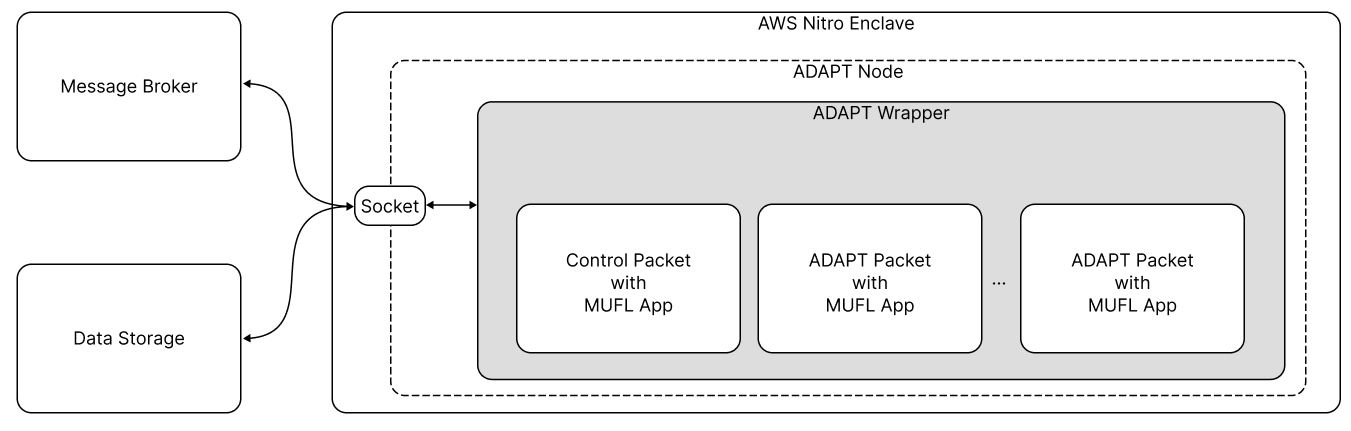
The dashed line in the diagram is a conceptual distinction. In reality, the node and the wrapper are one.
The ADAPT wrapper enables ADAPT packets to access the external environment. The definition of the external environment depends on the environment in which the ADAPT wrapper is running. For example, if the ADAPT wrapper is running in a web browser, a user clicking a button on a web page can trigger a specific transaction for an ADAPT packet. The web application code interacts with the ADAPT wrapper, requesting the execution of a particular transaction in a specific packet.
After an ADAPT packet is created, the ADAPT wrapper registers the packet with the message broker. Then, when a packet needs to send a transaction to a packet in another node, the ADAPT wrapper puts the transaction in a message and sends the message to the message broker. The message broker then forwards the message to the appropriate ADAPT wrapper.
When the sending and receiving packets are hosted by the same wrapper (the same node), the wrapper delivers the transaction locally, in process, without going through the message broker. Local delivery preserves the same behavior as broker routing — including attaching the sender’s identity-proof document on first contact — so application logic does not need to distinguish the two cases. Because it never leaves the node, same-node messaging works even when no broker is reachable: same-wrapper packets can message each other offline and before the wrapper has registered with a broker. A transaction addressed to a same-wrapper packet that does not exist yet is queued and delivered automatically once that packet is created.
The ADAPT wrapper also receives messages from the message broker, passing transactions coming from the external environment to packets inside the node.
Connection Resilience
The wrapper’s connections to the message broker and the backup storage are resilient to network interruptions:
- Automatic reconnection. If a connection drops, the wrapper reconnects automatically using exponential backoff (starting at 500 ms, capped at 30 seconds) with jitter.
- Automatic re-registration. After every reconnect, the wrapper re-registers all of its packets with the broker, so transactions are not dropped as belonging to an “unregistered packet” following a reconnect.
- Outage buffering. Outgoing messages produced while a connection is down are buffered and flushed, in their original order, once the connection is restored.
- Heartbeats. A lightweight keepalive runs over each connection: the client sends a heartbeat every 10 seconds, and a connection with no traffic for 35 seconds is treated as broken and reconnected. The broker applies the same idle timeout to heartbeat-capable clients.
ADAPT Wrapper Customization
The ADAPT wrapper is a single TypeScript module with multiple configuration options. The wrapper source lives at typescript/sdk/src/utilities/wrappers/ in the adapt-toolkit/adapt repository, and ships as part of @adapt-toolkit/sdk.
Each ADAPT node contains an ADAPT wrapper customized for one of these environments:
- Backend native environment - The native ADAPT wrapper implements the ADAPT wrapper for native platforms, such as Linux server and Docker.
- Backend AWS Nitro Enclaves - The enclave ADAPT wrapper implements the ADAPT wrapper for AWS Nitro Enclaves.
- Front-end web browser - The browser ADAPT wrapper implements the ADAPT wrapper for web browsers.
A native ADAPT wrapper running in EC2, an enclave ADAPT wrapper running in AWS Nitro Enclaves, and a browser ADAPT wrapper running in Chrome are examples of valid ADAPT nodes.
The ADAPT wrapper module implementations differ in these ways:
| Feature | Native Wrapper | Enclave Wrapper | Browser Wrapper |
|---|---|---|---|
| Cryptographically-secure random number generator | Sodium | Nitro Security Module (NSM) | Sodium |
| User verification request transactions | Not supported | Not supported | Supported |
| Packet access to backup data storage | Not currently supported | Supported | Not supported |
| ADAPT JS API | Native version | Enclave version | Browser version |
For additional information on the differences in the ADAPT wrapper module implementations, refer to the native, enclave, and browser wrapper pages.
A single executable runs the wrapper in any environment: it detects its runtime — native Node.js, an AWS Nitro enclave, or a browser (Wasm) — automatically and configures the wrapper accordingly. Its TypeScript source is typescript/sdk/src/utilities/executables/adapt_wrapper_script.ts (which invokes the wrapper module adapt_wrapper.ts) in the adapt-toolkit/adapt repository, and it ships as dist/utilities/executables/adapt_wrapper_script.js inside @adapt-toolkit/sdk. In a browser the wrapper instead runs as the Wasm build embedded in a web app (see Embed .muflo in your app).
The wrapper makes calls to the ADAPT JS API to manage the packet (create a packet, run transactions in it, create, mutate, and reduce values, etc.).
For more information, refer to ADAPT JS API Reference
Usage Help
The executable configures the wrapper using a single set of command line options; which options apply depends on the detected environment. For instance, only the AWS Nitro enclave environment uses the --storage_address and --control_packet options.
To display the script usage help, enter:
node adapt_wrapper_script.js --help
# or
node adapt_wrapper_script.js -h
To see the usage help for the other two scripts, replace
nativewithenclaveorbrowserfor the other scripts.
Output:
Usage of adapt wrapper configurator

address of the broker
|
'-->	--broker_address <arg>

address of the storage
|
'-->	--storage_address <arg>

Packet configuration
|
'-->	--packet ...

control packet configurattion
|
'-->	--control_packet ...

if true, adapt environment is initalized in test mode
|
'-->	--test_mode ...

Configurator of the logger
|
'-->	--logger_config ...

display help
|
'-->	--help | -h
You can also drill into additional details. For example, to display usage help for packet configuration, enter:
node adapt_wrapper_script.js --packet --help
Output:
Usage of packet configurator

hash of the code object
|
'-->	--unit_hash <arg>

Path to a directory containing the application. Current directory by default.
|
'-->	--unit_dir_path <arg>

id of the packet to back up from the storage. Packet gets backed up to the last available state.
|
'-->	--packet_id <arg>

state hash of the packet to back up from the storage. Packet gets backed up to the provided state.
|
'-->	--state_hash <arg>

Path to a directory containing the packet. Current directory by default.
|
'-->	--packet_dir_path <arg>

seed phrase to use while building container
|
'-->	--seed_phrase <arg>

ADAPT protocol message to send to the container after building
|
'-->	--message <arg>

If this flag is set, packet is loaded from the storage.
|
'-->	--load_from_storage

Transaction to be executed in the packet
|
'-->	--transaction ...

display help
|
'-->	--help | -h

Terminates the sequence. Example: --packet --packet_arg1 arg1 --packet_arg2 arg2 --packet_end --packet <next_packet> ...
|
'-->	--packet_end
ADAPT Wrapper Options
The tables in this section explain all the available wrapper script command line options along with which wrapper(s) support the options.
| Option | Example | Description | Default Value | Wrapper |
|---|---|---|---|---|
| –broker_address | –broker_address ws://localhost:1234 | The address of the message broker | None | All |
| –storage_address | –storage_address ws://localhost:1234 | The address of the backup data storage | None | Enclave |
| –packet | packet options | Configuration of a packet. Can be passes more than one packet using --packet_end |
None | All |
| –control_packet | control packet options | Control packet configuration | None | Enclave |
| –logger_config | logger options | Logger configuration | Default config | All |
| –test_mode | –test_mode | Toggle test mode on | False | All |
| –help|-h | –help | Display usage help | None | All |
Packet Options
| Option | Description | When Required |
|---|---|---|
| –unit_hash | 64 character long HEX hash code of the code object (.muflo file) |
Always |
| –unit_dir_path | a path to a directory containing the .muflo file |
If --load_from_storage not set |
| –packet_id | 64 character long HEX id of the packet | If we want to load the packet rather than create a new |
| –state_hash | 64 character long HEX hash code of the packet state (.muflp file) |
If we want to load exact state of the packet rather than the latest one |
| –packet_dir_path | a path to a directory containing the .muflp file |
If --load_from_storage not set |
| –seed_phrase | any string used as a seed phrase to create a packet | If we want to create a new packet rather than load from the existing one |
| –load_from_storage | If set an application or a packet will be loaded from the storage | If we want to load from the storage |
| –transaction | Transaction options. Can be passed more than one using --transaction_end |
If we want to run initial transactions in the packet |
| –init_trn_argument | Argument passed to the packet’s initialization transaction | If the packet’s init transaction takes an argument |
| –attempt_backup | Attempt to back up the packet; if backup data is not available, create a new packet | If we want to restore-or-create in one step |
| –replicas | Create additional replicas of the same container using random seed phrases | If we want more than one replica |
| –help|-h | Display help | If we want to display help |
| –packet_end | To terminate the packet configuration | If we want to add other configurations after this one |
Control Packet Options
| Option | Description | Required |
|---|---|---|
| –load_from_storage | If set the application will be loaded from the storage | If we want to load the application from the storage |
| –unit_hash | 64 character long HEX hash code of the unit (.muflo file) |
Always |
| –seed_phrase | Any string used as a seed phrase to create a packet | Always |
| –init_trn_argument | Argument passed to the control packet’s initialization transaction | If the init transaction takes an argument |
| –logs_path | Path inside enclave where system logs should be collected | Always |
| –control_packet_dir_path | Path to a directory containing the .muflo file |
Always |
| –help|-h | Display help | If we want to display help |
| –control_packet_end | Terminated the configuration | If we want to pass another configuration after this one |
Transaction Options
| Option | Description |
|---|---|
| –name | Name of the transaction |
| –targ | JSON argument of the transaction |
| –help|-h | Display help |
| –transaction_end | Terminate the configuration of the transaction |
Logger Options
| Option | Description |
|---|---|
| –level | Logging level. One of ERROR, WARNING, INFO, DEBUG_MESSAGES, DEBUG |
| –messages_type_ids | Space separated list of messages type IDs. Only messages with provided IDs get printed to logs |
| –stdout | A file to redirect the logger stdout to |
| –stderr | A file to redirect the logger stderr to |
| –print_callstack | Level of the logging to print log call stack |
| –help|-h | Display help |
| –logger_config_end | Terminate current configuration of the logger |